


Wigo Live-Live Video Chat
4.4138.00 Reviews
App Specs
- Version
- 1.7.9
- Updated On
- License
- Free
- Downloads
- 5,000,000+
- Developer
- Wigo Team
- Categories
- Social
- Platform
- Android
Screenshots





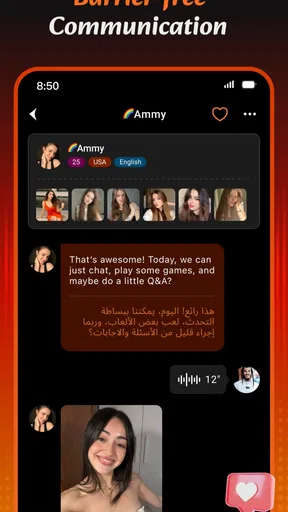
 Analysis by AppCompare
I tend to judge social apps by a simple question: do they help me have better conversations, or do they merely give me more things to watch? Wigo Live sits somewhere between those two experiences. It is a social app from Wigo Team built around video calls, chat, live streaming, and meeting people from different parts of the world. In my use, its main appeal is immediacy. Instead of composing a polished profile update or waiting for replies, I can move toward a more direct, face-to-face exchange.
That immediacy changes the rhythm of communication. A text conversation gives me time to think, edit, and decide whether I want to continue. A live conversation asks for attention right now. That can make an interaction feel warmer and more spontaneous, but it also means I need clearer boundaries than I would with an ordinary messaging app. Wigo Live works best when I treat it as a deliberate social space, not as background entertainment.
The app is free to install and is listed for mature users aged 17 and above. It has an average rating of 4.3 from around 96 thousand ratings and has passed 5 million installs, which suggests that the format has found a sizeable audience. The current version is 1.7.9, and it runs on Android 7.0 or later. Optional purchases range from $0.99 to $99.99 per item, so the free starting point is useful, but I would still pay attention before spending inside the app.
How Wigo Live Changes the Way Conversations Begin
I focus here on the shift from waiting for replies to choosing a moment for live conversation, because that is what most clearly distinguishes Wigo Live from an ordinary messaging app. In the next section, I look at how that immediacy can make an exchange feel more present—and why deciding what I want from a session before joining helps keep it worthwhile.
From waiting for replies to choosing a moment
What stood out to me first was how different live social communication feels from the usual pattern of sending a message and checking back later. In a conventional chat app, I can answer while commuting, return to a conversation after dinner, or leave a message until I have the energy for it. Wigo Live encourages a more immediate decision: am I ready to talk now, and do I want to give this interaction my full attention?
That can be refreshing when I am looking for a real exchange rather than another long message thread. A short video call can communicate tone and reaction much faster than several text messages. A live stream can also create the feeling of joining an ongoing room instead of entering a private conversation from the beginning. For someone who enjoys meeting unfamiliar people and responding in the moment, that lower distance is the strongest reason to try it.
The trade-off is that speed can reduce clarity. A person may appear friendly in a quick interaction without the conversation actually having much substance. I found it useful to decide what I wanted from a session before opening the app: a brief conversation, a chance to observe a live stream, or a genuine attempt to make a new connection. Without that small decision, it is easy to move between interactions without remembering why I opened the app.
Worth Reading Before You Choose

EA SPORTS FC Mobile 26 Is a Bigger Football Game, but It Takes Time

Flipboard Shows What News Apps Must Do Beyond the Feed

Switching to Android Auto Means Rethinking Your Driving Routine

Google Calendar Makes a Crowded Week Easier to Manage

Ludo King Makes the Most of the Minutes Between Plans

Baby Panda World Brings Quick Play to Modern Phones, but Its Game Library Feels Busy
Where the app fits beside ordinary social tools
Wigo Live is not a direct replacement for every kind of social app. Messaging services are better when I need a dependable record of plans, a quiet exchange, or a conversation with people I already know. Traditional social networks are usually better for following familiar contacts over time. Video meeting tools are more suitable for work, school, or organized group discussions where identity, scheduling, and structure matter.
This app makes more sense when discovery and immediacy matter more than organization. Its combination of live streaming, chat, and video calls places it closer to a casual social lounge than a formal communication tool. I would recommend it to someone who enjoys spontaneous interaction and does not mind that conversations may be brief, uneven, or unpredictable. I would not choose it as my main app for important conversations, family coordination, or anything that requires a clear written trail.
One practical way to use it is to separate browsing from participation. I can spend a few minutes seeing what kind of live interaction is available, then decide whether to join a conversation rather than automatically responding to every invitation or interesting room. That small pause improves the experience because it keeps curiosity from turning into an obligation.
What makes the flow feel natural
Video changes the amount of information exchanged in a short time. Facial expression, pauses, voice, and reactions can make a conversation feel more personal than text. That is especially useful when people come from different places and may not share exactly the same communication style. A smile or a pause can sometimes clarify intent better than a translated sentence.
At the same time, live conversation rewards people who are comfortable improvising. If I need time to formulate every answer, the pace can feel demanding. I also found that the best interactions are not necessarily the longest ones. A focused exchange with a clear topic can be more satisfying than staying in a room simply because it is active.
My advice is to enter with one easy opening question and one graceful way to leave. Asking about a person’s interests, daily routine, or favorite kind of content gives the conversation somewhere to go. If the interaction becomes uncomfortable or repetitive, ending it politely is better than staying because the app makes continuing feel effortless.
Attention is the hidden cost
The biggest limitation is not technical complexity; it is attention. Live social apps can make every moment feel like an invitation to respond. Even when I intend to stay for only a few minutes, the possibility of a new conversation can keep me looking. That is a different kind of pressure from a normal inbox, where unread messages wait for me. Here, the social moment may disappear if I leave, and that can make the decision feel urgent.
I would avoid using Wigo Live while doing anything that already needs concentration. It is a poor companion for studying, driving, work calls, or conversations with someone beside me. The app’s value comes from being present, so splitting attention weakens both the live interaction and the activity I am trying to do at the same time.
A better everyday routine is to create a defined window. For example, I might open it after finishing my evening tasks, use it while I have enough energy to talk, and close it when I notice myself scrolling without interest. The point is not to make the app rigid; it is to stop an open-ended social feed from deciding how long I remain available.
A realistic everyday scenario
Imagine finishing a long day and wanting contact without arranging a formal call with a friend. With Wigo Live, I could open the app, look for a live interaction, and decide whether I want to watch, chat, or take part in a video conversation. If I meet someone interesting, I can keep the exchange short and leave with a pleasant moment rather than committing to another ongoing group or message thread.
That scenario also shows the app’s weakness. If I am tired, shy, or not prepared to be seen and heard, the same immediacy can feel like work. A messaging app would let me remain social at a lower emotional cost. Wigo Live is more rewarding when I want active contact, but less convenient when I only want quiet companionship.
Boundaries matter more here than in text chat
I would approach every unfamiliar interaction with ordinary caution. I would avoid sharing personal contact details, financial information, my exact location, or anything I would not want repeated outside the conversation. A live video exchange can create a quick sense of familiarity, but a few minutes of friendly conversation is not the same as trust built over time.
It is also worth deciding in advance what kind of interaction I will leave immediately. Pressure to spend money, requests for private information, aggressive flirting, repeated unwanted contact, or attempts to move the conversation somewhere more private are all good reasons to stop. I do not need to justify leaving a conversation that makes me uncomfortable.
The mature age classification is important in setting expectations. I would not treat the app as a general-purpose space for children, and I would be especially careful about younger users accessing it. Adults should also remember that live communication can expose them to people whose intentions are unclear. The social freedom is useful, but it requires personal judgment rather than passive trust.
Spending can change the feeling of the app
The free entry point makes it easy to explore, but optional purchases can introduce a second layer into the experience. I prefer to use the app without spending until I understand how its social rhythm works for me. If an interaction starts to feel as though I must pay to maintain attention, access a preferred experience, or keep pace with others, I would step back and reconsider whether the app is still serving its original purpose.
Because individual items can cost from $0.99 up to $99.99, a small purchase can sit very close to much larger spending. I would set a personal limit before buying anything and avoid making purchases during an exciting live interaction. Live environments are designed around the present moment, and that is exactly when it is easiest to act before thinking.
This is one of the less obvious trade-offs of the format: the same immediacy that makes conversation lively can also make spending feel urgent. Keeping social enjoyment and purchasing decisions separate helps preserve control.
Who will enjoy it most
I see Wigo Live as a good fit for people who enjoy meeting strangers, practicing casual conversation, exploring different personalities, and participating in live social spaces. It may also suit someone who finds carefully edited profiles less interesting than seeing how a person reacts in real time. If you are comfortable with short conversations that may not develop into lasting friendships, the app can provide variety without requiring a formal social plan.
It is less suitable for someone seeking a quiet, private, predictable experience. People who dislike being on camera, want strong control over when others can reach them, or prefer conversations with established contacts may be happier with ordinary messaging or scheduled calls. I would also skip it as a primary choice for professional networking, serious dating decisions, customer support, or sensitive personal discussions.
Language and cultural differences can be both a benefit and a challenge. They create opportunities to learn how other people communicate, but they can also produce misunderstandings that are harder to correct at live speed. I found that simple questions and patience work better than trying to sound clever. If a conversation becomes unclear, asking for clarification is more useful than guessing at the person’s meaning.
Small habits that improve the experience
I would keep the first conversation short until I understand the tone of the person and the space. A short first meeting gives me enough information to decide whether I want to return without creating unnecessary pressure. If the interaction is good, a later conversation has room to grow; if it is poor, leaving early prevents a minor annoyance from becoming a recurring distraction.
I would also use audio and visual awareness as part of basic privacy. Before starting a video interaction, I would check what is visible behind me and avoid showing documents, screens, addresses, or other people without their permission. This is a simple habit, but live video makes accidental disclosure much easier than text.
Another useful approach is to notice the emotional effect after using the app. Do I feel connected, amused, curious, and refreshed, or restless and overstimulated? That answer is more valuable than the number of conversations I had. If the app consistently leaves me distracted, I would reduce the length of sessions or choose a slower social tool instead.
Performance expectations and practical fit
The app’s Android compatibility reaches back to version 7.0, so it is available to people using older devices than many newer social products support. Even so, live video depends heavily on the quality of the device, camera, microphone, and internet connection. I would not judge a conversation entirely by a single rough session if the connection is unstable, but I would also avoid relying on it for an important appointment.
For casual use, a phone is the natural setting because the app is designed around quick access and personal interaction. That convenience can encourage spontaneous use anywhere, which is helpful when I have a quiet moment but risky when I am in a public place or around people who do not want to appear on camera. Choosing the setting carefully improves both privacy and conversation quality.
My social verdict
After using Wigo Live, I see its strongest quality as a change in communication tempo. It moves social contact away from carefully prepared messages and toward immediate presence. That can make a short exchange feel surprisingly human, especially when I want to meet people beyond my existing circle. The combination of video calls, chat, and live streams gives the app more than one way to participate, so I am not forced into the same level of involvement every time.
Still, I would not recommend opening it without a boundary. The app can consume attention quickly, and its live nature may make users feel that they should remain available or respond immediately. The mature audience setting, unfamiliar contacts, and optional purchases all reinforce the need for judgment. I would use it in planned sessions, keep personal information private, and treat every new interaction as an introduction rather than an established relationship.
My recommendation is positive but selective: try Wigo Live if you want spontaneous video-based socializing and are comfortable managing your time, privacy, and spending. Choose a traditional messenger when clarity and continuity matter more, and choose a structured video service when the conversation has a professional or important purpose. For the right user, Wigo Live makes communication more immediate and varied; for someone who values quiet control, that same immediacy may be the reason to pass.
Wigo Live is developed by Wigo Team, is free to start, and currently appears as version 1.7.9. I would approach it less like a service I need to check constantly and more like a social room I enter when I genuinely want to talk. Used that way, Wigo Live can add real spontaneity to an ordinary day without taking over the rest of it.
Pros
- Easy way to meet people through live video interactions.
- Real-time chats make conversations feel more personal and engaging.
- Useful discovery features help you find new streamers and users.
- Supports casual entertainment without requiring advanced technical skills.
- Frequent social activity can make the platform feel lively and interactive.
Cons
- Video calls may consume significant mobile data and battery power.
- User activity and content quality can vary considerably by time of day.
- Some interactions may feel repetitive after extended use.
- Privacy depends on how carefully you manage profile and chat settings.
- A stable internet connection is essential for smooth live video.
FAQs for Wigo Live-Live Video Chat
What is Wigo Live-Live Video Chat, and what can I use it for?
Wigo Live-Live Video Chat is a social communication app focused on live video conversations and meeting people online. After creating a profile, users can browse available contacts, start video chats, and interact through the app’s social features. It is mainly designed for casual conversations and entertainment, so the experience depends heavily on the quality and activity of the community in your region.
Is Wigo Live-Live Video Chat free to download and use?
The app may be free to download, but some communication or social features can require in-app purchases, virtual credits, subscriptions, or other paid options. Before starting a chat, check the pricing information shown inside the application and review the payment terms in Google Play or the App Store. Availability and costs can vary depending on your country, device, and account.
Is Wigo Live-Live Video Chat safe for meeting strangers online?
As with any live video chat platform, users should be careful when communicating with people they do not know. Avoid sharing your home address, phone number, passwords, financial information, or private photographs. Use the app’s block and report tools if someone behaves inappropriately, and end the conversation whenever you feel uncomfortable. Parents should also consider whether the app is suitable for younger users.
Does Wigo Live-Live Video Chat require an account, camera, and microphone?
Most of the app’s main functions require registration or a user profile, since video chat services need to connect conversations to an account. A working camera and microphone are also necessary for two-way video and audio communication, although certain features may work with permissions disabled. Review the requested permissions during setup and allow only the access needed for the features you intend to use.
What should I check before downloading Wigo Live-Live Video Chat?
Before installing Wigo Live-Live Video Chat, confirm that your Android or iOS version is supported and that your device has enough storage and a stable internet connection. Read the current store listing, privacy policy, age rating, user reviews, and in-app purchase details. Also remember that video calls can consume considerable mobile data, so Wi-Fi may be preferable for longer conversations.


